ARRANCADA Getting Started: Your First 201m Run
Join ARRANCADA, stage cleanly, launch with control, and finish a full strip pass without guessing.
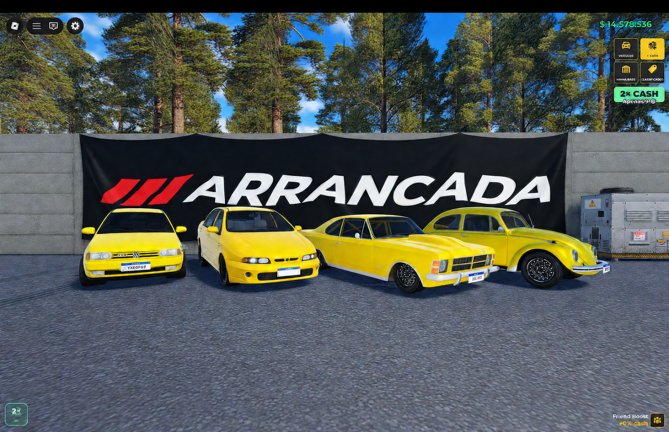
ARRANCADA is a Brazilian multiplayer drag-racing experience on Roblox by Patricia07692. You line up on a short strip, launch hard, shift through the powerband, and read a timing slip when you cross. This guide walks a brand-new player from joining the place to completing a clean 201m run — the length most early sessions revolve around. Community talk also mentions 402m racing later; the habits you build here still apply.
Before you chase Stage 4 turbos or Classificados deals, you need one trustworthy pass: solid staging, a controlled launch, sensible shifts, and a glance at the Runs panel. Pair this page with Controls for input details and Launch and Racing when you are ready to chase reaction times.
Join the experience
- Open the Roblox place for ARRANCADA and wait for the world to load fully — cars, strip UI, and Workshop buttons appear after assets finish streaming.
- Confirm you can move, open menus, and see currency or event tags (you may notice tags like [2x💵] during boosted windows).
- Skim any onboarding tips the game shows. Do not skip launch-control or transmission notes if they appear.
- Bookmark this wiki’s Guides Hub so you can jump to tuning and Visual pages after the first race.
You do not need promo codes to start. Check Codes only when official drops appear — as of late November 2026 there are no verified working promo codes, and invented lists waste time.
Pick a car and know what you are driving
Official description cars include Opala SS, Diplomata, Chevette, Gol GTI, and Audi RS6. The community also tunes platforms such as Subaru Impreza, GTR R35, Camaro ZL1, BMW M4, and Golzinho. For day one, use whatever starter or affordable car you already own. Learn the strip on a predictable setup before shopping Classificados.
Open the Workshop when you can. You will eventually use:
- Performance — engine and turbo stages (Original through Stage 4), transmission type, and related power parts (Tuning and Upgrades).
- Gear ratios and fuel — short/tall gearing plus gasoline, ethanol, or methanol (Gear Ratios and Fuel).
- Visual — paint, windows, wheels, tires, suspension, height, offset, hood, wing, exhaust, cage (Car Customization).
On your first hour, change only what you understand. A stock-feeling car that you can launch cleanly beats a half-finished Stage mix that spins or bogging launches.
Walk to the strip and stage
Find the drag strip and enter the staging area the same way regular players do in your session (queue lane, pad, or marked start — follow in-world markers). Staging goals:
- Align straight. Crooked launches waste the 60-foot.
- Stop fully before arming launch control.
- Know whether you are on automatic or manual transmission before the tree runs.
- Keep a mental checklist: fuel selected, launch control set, camera comfortable.
If controls feel wrong, pause and open Controls for PC versus mobile mappings. Practice rolling into the beams without mashing full throttle early.
Launch control and the first hit of throttle
ARRANCADA expects you to use launch control as part of a serious pass. Typical flow:
- Stage and hold brake or the staging input your platform uses.
- Build or set launch control to a stable RPM band you can repeat — exact numbers live in the menu; do not copy unverified “magic” RPMs from random chat.
- Release on the go signal with a smooth throttle application. Spinning the tires looks dramatic and ruins reaction-to-60-foot consistency.
- Stay in the groove. Steering corrections mid-launch cost ET.
Your first goal is not a server record. Your first goal is a repeatable launch. After the pass, open the Runs panel and note reaction time and 60-foot. Those two numbers teach more than chat advice.
Shifting through the 201m
Automatic transmission lets you focus on launch and steering while you learn the strip. Manual adds clutch/shift inputs and rewards hitting the powerband — once you can launch without panic, try manual on a quiet session. Mid-track:
- Shift before the engine falls off or hits a hard limiter (watch the tach in-game).
- Avoid early upshifts that bog and late holds that bounce the rev limiter.
- Keep the car straight; ARRANCADA is a drag sim, not a drift lobby.
On 201m you have limited time to recover from a bad first gear. If the launch was messy, finish the pass anyway and study the slip — then reset and try again.
Read the Runs panel after every pass
The Runs panel stores timing slips: reaction, 60-foot, and 0–100 style metrics along with overall time. Use it like a coach:
- Slow reaction → focus on the tree and release timing (Launch and Racing).
- Strong reaction but weak 60-foot → launch control, tire/traction feel, or first-gear ratio.
- Good short times but fading mid-track → gear spacing or fuel choice (Gear Ratios and Fuel).
Never invent multipliers or claim one fuel is always fastest. Check the live Workshop labels for the current build of the game.
First-hour upgrade priorities (without wasting currency)
- Confirm you can complete clean passes on your current car.
- Put early currency into Performance steps you understand — often engine/turbo progression toward Stage 4 over random Visual parts.
- Touch gear ratios only after you can launch consistently.
- Save Classificados purchases until you know which platform you enjoy.
- Watch for [2x💵] or similar event tags to stretch grinding sessions.
Detailed upgrade order lives in Tuning and Upgrades. Visual flair can wait until the car leaves the line cleanly.
Common beginner mistakes
- Mashing throttle with no launch control plan.
- Buying a Classificados car before learning staging.
- Changing gears, fuel, and turbo stage in one pass so you cannot tell what helped.
- Ignoring the Runs slip and “feeling” faster without data.
- Hunting fake codes instead of racing (Codes).
What to do next
After five clean 201m runs, open Launch and Racing and practice reaction consistency. Then climb the Workshop with Tuning and Upgrades. When the car feels stable, refine Gear Ratios and Fuel, shop Cars and Classificados, and style it in Car Customization. Return to the Guides Hub whenever you need the full map.
ARRANCADA rewards patience on the line more than spam clicking. Stage straight, launch with intent, shift on purpose, and let the slip tell you the truth.
Frequently Asked Questions
Quick answers about codes, tuning, 201m runs, and updates.
How long is the main ARRANCADA drag race?
Most early play centers on 201m runs. Players also discuss 402m passes when that distance is available. Learn launch and gears on 201m first.
Should I use automatic or manual as a beginner?
Automatic is fine for your first clean passes so you can focus on staging and launch control. Switch to manual once you want finer shift timing.
Do I need codes to start ARRANCADA?
No. Play and earn in-session. As of late November 2026 there are no verified working promo codes — see the Codes hub for honest updates.
What should I upgrade first?
Prioritize Performance steps you understand (engine/turbo progression) after you can launch cleanly. Avoid changing gears, fuel, and visuals all at once.
Where do I see reaction and 60-foot times?
Open the Runs panel after a pass. Use those slips to judge launch quality before buying more parts.